Resigning is exciting, terrifying, and a bit boring all at once. The boring bit - the payroll mechanics of leaving - is where money quietly slips through the cracks. Untaken holiday, the timing of your last payslip, the P45, and the way HMRC handles your next job all need to line up. This 12-point checklist walks you through what to verify before, during, and after you go. Figures use the 2026/27 tax year.
To check whether the tax, NI and PAYE lines look right on your own slip, see How do I check my payslip is correct?.
Want to check if your own payslip adds up?
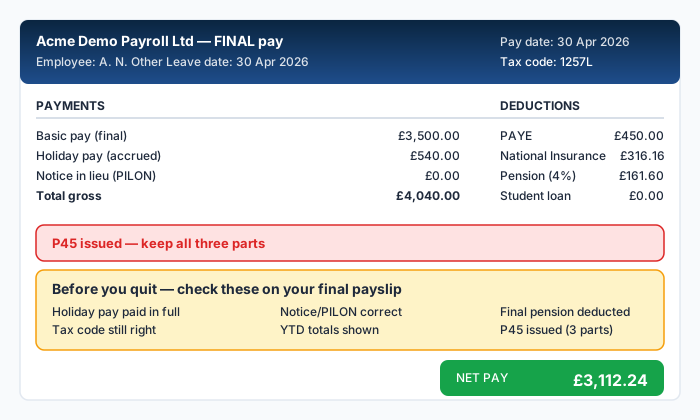
Before you hand in notice
Three checks first - they are easy and they shape the rest of the conversation with HR.
1. Confirm your contractual notice period
Your contract specifies notice on both sides. The statutory minimum is one week if you have been there a month or more. Most professional contracts are between 1 and 3 months. Check:
- Length of notice in your contract
- Any "garden leave" clause (you stay on payroll but stop working)
- Any "pay in lieu of notice" (PILON) clause
- Whether you can take annual leave during notice
PILON is taxed and NI'd as normal earnings since 2018 (no more "30,000 tax-free bonus on the way out"). Read our P45 guide for how this all reports.
2. Calculate your accrued, untaken holiday
UK law gives 5.6 weeks of holiday a year (28 days for full-time, including bank holidays). On leaving, you are entitled to be paid for any leave accrued but not taken.
The pro-rata calculation is:
- (Your annual entitlement / 365) x days worked in the leave year - days taken = days owed
If your employer rounds down, that is unlawful. They must round at half-day or whole-day units consistently. Read more on holiday pay rules at acas.org.uk.
3. Get your P11D / payrolled BIK reconciled
If you have a company car, private medical, or any other BIK, the value will be apportioned to your leaving date. Ask HR for a year-to-date BIK statement so you can spot if the wrong amount is being clawed back from your final pay.
During notice
Five things to verify on every payslip during the notice period.
4. Notice pay calculation
If you are working your notice, your normal pay continues. If you are placed on garden leave, the same. PILON should be calculated on your normal salary for the unworked notice plus benefits.
Worked example: salary £45,000, three-month notice, PILON taken in lieu.
- Three months' pay: £45,000 / 4 = £11,250
- Tax at 20%, assuming cumulative pay for the year stays under £50,270: £2,250
- NI: the payment lands in one pay period, so most of it sits above the £4,189 monthly Upper Earnings Limit where the rate drops to 2%. On the PILON alone that is 8% of (£4,189 − £1,048) = £251.28, plus 2% of the £7,061 above the limit = £141.22, so £392.50
- Pension salary sacrifice: usually paused on PILON (saving lost)
- Net PILON: £8,607.50
The NI line is the one people get wrong. Charging the whole £11,250 at 8% would give £900; the real figure is well under half that, because a single large payment clears the monthly Upper Earnings Limit almost immediately. If your own cumulative pay has already passed £50,270 for the year, the tax line rises to 40% and the answer changes; the NI line does not.
If you have BIKs, the cash-equivalent value for the unworked period is also taxable.
5. Holiday pay paid out
Untaken holiday must be in the final payslip. The rate is your normal earnings at the time of payment. If you have variable pay (commissions, regular overtime), recent case law requires the average of the last 52 paid weeks to be used.
6. Check the YTD figures
Your final payslip's year-to-date totals must match the cumulative payments across all payslips that tax year. Add up:
- Gross YTD
- Tax YTD
- NI YTD
- Pension YTD
- Student loan YTD
If anything does not reconcile, raise a query before you receive your P45 - it is much harder to fix afterwards.
7. Confirm pension contribution timing
Your final salary contribution should be processed in the final pay run. If your scheme uses salary sacrifice, employer contributions are typically paid for that month. Check your pension provider's portal in the following week to verify the money landed.
8. Check your expenses are reimbursed
Outstanding expense claims should be paid in the final payslip or as a separate non-taxable payment. They should not be in the taxable pay column.
A common error: the employer adds your final mileage claim to gross pay, increasing tax and NI. Mileage at HMRC's approved rates (55p / 25p from April 2026) is not taxable. Read our expenses vs benefits guide for the rules.
On your last day
9. The P45
Your employer is required to issue a P45 "at the time of leaving or without unreasonable delay". In practice this means within a few days of the final pay run, occasionally up to a fortnight if the payroll cycle is awkward.
The P45 has four parts:
- Part 1 - sent by the employer to HMRC
- Part 1A - your copy (keep for records)
- Part 2 - for your new employer
- Part 3 - your new employer fills in and sends to HMRC
Most P45s are now electronic, often delivered as a PDF in your payroll portal. Save the file and the figures to your records.
10. Final tax code
Your final payslip will show whatever tax code applied during your last pay period. When you start a new job, this code is normally carried across.
If you do not have a P45 ready when you start the new job, you will likely be put on a BR or 0T emergency code. This is fixable but you may overpay tax in months 1-2 of the new role until HMRC reconciles. Read our emergency tax codes guide.
After you leave
11. Verify HMRC has reconciled
Within a few weeks of your final RTI submission, your personal tax account at gov.uk/personal-tax-account should show your year-to-date pay and tax. If the figures look wrong:
- Compare against your P45 Part 1A and final payslip
- Raise discrepancies with HMRC on 0300 200 3300
- Ask the employer for a corrected FPS submission if the data is wrong at source
12. Watch for the P800
If you leave mid-year with no immediate next job, HMRC will reconcile at year-end and may issue a P800 showing a refund or a balance owed. A refund offered on a P800 and claimed online by bank transfer is paid within 5 working days (HMRC); balances under £3,000 are collected through a future tax code.
If you start a new job in the same tax year, the P800 may show a refund through the new employer's payroll instead.
If you leave the UK altogether, complete a P85 form at GOV.UK to claim any tax refund and confirm your residency status. Without it, HMRC will continue to assume you are UK-resident and you will not receive any overpaid tax for the partial year.
Bonus check: starter checklist for the next job
If you have a P45, hand it to the new employer's payroll team straight away. If you do not (P45 delayed, second job, or just left a long break), complete a starter checklist instead:
- Statement A: this is your only or main job since 6 April
- Statement B: this is your only job, but you have had another since 6 April
- Statement C: you have another job or pension
Statement A gives you 1257L cumulative. Statement B gives 1257L Month 1 (non-cumulative). Statement C gives BR. Read our PAYE cumulative vs non-cumulative guide for what each means.
Quick reference checklist
For when you are skim-reading on the day:
- Notice period read from contract
- Holiday accrual calculated and paid out
- PILON correctly taxed (no 30k exemption)
- BIK reconciled to leaving date
- YTD totals match across payslips
- Final pension contribution processed
- Expenses reimbursed (not in taxable pay)
- P45 received within days of leaving
- P45 saved for new employer
- New job starter checklist completed if needed
- Tax account shows correct figures
- P800 monitored if leaving the country
Run the figures through PayslipIQ's free payslip checker to be sure, or compare your expected take-home with our take-home calculator.
Frequently Asked Questions
What happens if my employer is late with my P45?
Raise it in writing first. If still no P45 after two weeks, HMRC's online checker will eventually pick up the missing FPS submission. You can start your new job on a starter checklist in the meantime - you will not lose money long-term.
Can my employer deduct from my final pay for things like training costs?
Only if it is in your contract or you agreed to it in writing. Generic clauses like "we may recover training costs" are usually enforceable for a sliding scale but cannot leave you below the National Minimum Wage for the period.
Do I lose holiday I did not take?
Untaken statutory holiday must be paid out on leaving. Contractual holiday above the statutory minimum may be lost depending on policy. Check your handbook.
Do I need to tell HMRC I have left a job?
No - your employer's RTI submissions handle this. You only need to act if you are leaving the UK (P85) or moving to self-employment (Self Assessment registration).
What if my final payslip looks lower than expected?
Check the cumulative tax line. Sometimes a leaving payslip triggers extra deductions if HMRC is recovering a previous underpayment. Use our free checker to identify the missing piece.
Sources
Ready to check your own payslip?
Enter your figures and get an instant AI-powered analysis. Free, private, no signup.
Check my payslip freePayslipIQ provides educational information and estimated calculations only. It does not provide tax, legal, financial, payroll, accounting, pension, benefits or employment advice. Always verify your payslip, tax code, deductions and take-home pay with your employer's payroll department, HMRC, your pension provider, a qualified accountant, tax adviser or another appropriately qualified professional.