Every UK payslip sends HMRC an electronic report within hours. The system is called Real Time Information, or RTI, and it feeds the calculation that decides what tax code you should be on next month.
Most people only meet it when their tax code changes unexpectedly. This guide explains what is going on behind the scenes, why your code can change mid-year, and how to interpret the letters HMRC sends. Updated for 2026/27.
Want to check if your own payslip adds up?
What is RTI?
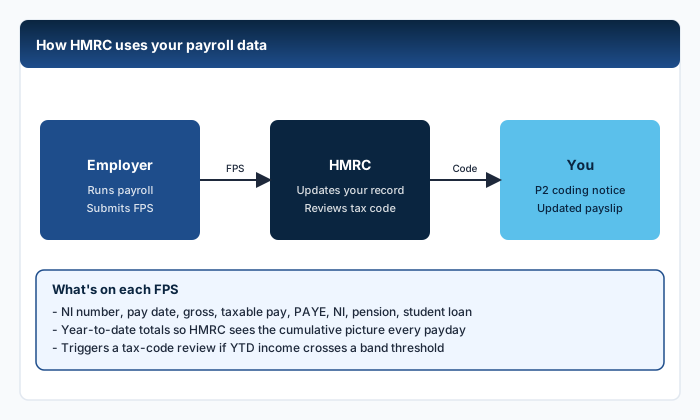
RTI (Real Time Information) is the system HMRC introduced in 2013 to replace the old paper-based "P14 / P35" annual reporting. Under RTI:
- Your employer sends a Full Payment Submission (FPS) to HMRC every payday
- The FPS includes your gross pay, tax, NI, student loan, and benefits
- HMRC compares the totals against expected earnings and your current tax code
- Discrepancies trigger automated coding actions
The system means HMRC has a near-real-time picture of your earnings across all your PAYE jobs. They can spot under- and over-payments long before the tax year ends.
What an FPS contains
Each FPS line for an employee includes:
- HMRC payroll ID (links to your NI number)
- Pay date
- Pay frequency (weekly, monthly, four-weekly)
- Tax code in force
- Year-to-date gross, tax, NI
- This-period gross, tax, NI
- Student loan plan and YTD/period figures
- Pension contribution
- Statutory pay (SMP, SSP etc.)
- Payrolled benefits in kind
If anything changes - new tax code, started leave, took a bonus - the FPS reflects it. Errors in the FPS show up on your personal tax account at GOV.UK.
Dynamic coding: why your code changes mid-year
Before 2017, tax codes only changed once a year (for the new tax year) or after a manual review. Since 2017, HMRC uses "dynamic coding" - they recalculate your code whenever significant data changes.
The triggers most likely to change your code mid-year:
- Starting or stopping a second job
- A pay rise that pushes you into a new band
- A taxable benefit added or removed (P11D adjustments)
- Pension contributions reported through RTI
- Marriage Allowance election or revocation
- Self Assessment results applied through PAYE
You receive a coding notice (P2) by post or in your personal tax account. The new code applies from the next FPS your employer files.
Worked example: dynamic coding mid-year (2026/27)
You earn £45,000 with code 1257L. In month 5 (August), you start a £15,000-a-year evening side job under PAYE. The second employer reports their first FPS to HMRC.
- HMRC's algorithm sees combined annual income forecast at £60,000
- £60,000 - £50,270 = £9,730 in the higher-rate band
- Higher-rate tax: £9,730 × 40% = £3,892
- Basic-rate tax: £37,700 × 20% = £7,540
- Total expected income tax: £11,432
- To collect this through PAYE, HMRC keeps your main job on 1257L (taking 20% on most of it) and applies a D0 code to the second job (taking 40% on all of it)
- You receive two coding notices within days of starting
If you only earn £15,000 from job two for half the year (£7,500 actual), HMRC will reconcile via P800 at year end and refund any over-deduction. The dynamic system over-corrects deliberately to avoid underpayment.
Dynamic coding is why your code can change without you doing anything. HMRC's view of your annual income shifts as new RTI data arrives. The codes are best understood as forecasts, not facts. If they are wrong, log into your personal tax account and update your "expected income" figures.
What HMRC's letters mean
Each year you might receive several coding letters. Decoding them:
- P2 - the standard coding notice telling you the new code and how it was calculated
- P6 - the version sent to your employer (you do not normally see this)
- P9 - bulk coding update at the start of the new tax year
- P800 - end-of-year reconciliation showing refund or underpayment
- PA302 - simple assessment for those not in Self Assessment
- P9X - employer guidance pack each April
The P2 is the most important to read. It lists each piece of the calculation: personal allowance, deductions for benefits, deductions for previous underpayments, additions for marriage allowance, and so on. The total becomes your numeric tax code with letter suffix.
Reading a P2 line by line
A typical 1083L P2 might say:
- Personal allowance: £12,570
- Less: estimated company car BIK: £1,200
- Less: medical insurance: £540
- Total tax-free amount: £10,830
- Drop the last digit and use 1083L
Your "tax code" is shorthand for "your real tax-free amount divided by 10".
Why your tax code might change suddenly
The most common patterns we see at PayslipIQ:
- You started a second job: triggers BR/D0 on the secondary income
- HMRC found you owe tax from a previous year: code reduced to recover up to £3,000 over the next year
- A benefit was payrolled: code reduces by the BIK value
- You filed a Self Assessment: any balance under £3,000 is recovered through PAYE
- Marriage Allowance election or transfer: allowance adjusted by £1,260, worth £252 of tax
- Underpayment from a previous code mismatch: HMRC issues a corrective code
If you do not understand the change, the P2 is the source of truth. Read it slowly.
Spotting RTI errors before they hit your bank balance
A few sanity checks every couple of months:
- Log into your personal tax account at gov.uk/personal-tax-account
- Check "Current year income" matches your YTD payslip totals
- Check the tax code shown there matches the one on your latest payslip
- Check no "rogue" employments are listed (sometimes a former employer fails to mark you as a leaver)
If you spot a mismatch, the cause is almost always one of three things:
- Employer's FPS submission was late or wrong
- HMRC's "expected income" figure is out of date
- A previous job has not been formally closed (no P45 / leaver indicator)
The fix is a phone call to HMRC on 0300 200 3300, or a webchat in your tax account. Both can correct the data the same day.
To check whether those tax-code and NI lines look right on your own payslip, see How do I check my payslip is correct?.
If a former employer never marked you as a leaver, HMRC continues to assume you have two active jobs. A common symptom is a sudden BR or D0 code on what is actually your only employment. The fix requires the old employer to file a corrected FPS - chase them and HMRC at the same time.
RTI and student loans
Student loan repayments are reported in RTI in the same way as tax. The Student Loans Company sees the FPS and updates your balance roughly weekly.
If you switch from PAYE to Self Assessment, the SLC reconciles annually. If you have multiple PAYE jobs, the deduction is taken per pay period, per job - which can lead to small over-deductions that you can claim back from the SLC.
Read our student loan guide for plan-specific rates, or use our student loan calculator.
RTI and pensions
Employer pension contributions are reported in RTI but are not deducted from gross pay (employer-only). Employee contributions are reported and reduce gross taxable pay if it is a salary sacrifice or net pay arrangement.
This means HMRC sees your contribution levels and can adjust your code if you are a higher-rate taxpayer claiming relief at source. The "auto-relief" mechanism is gradually being rolled out for employers using RTI to flag higher-rate contributions.
How long until a tax code change reaches your payslip?
Once HMRC issues a P9, the timeline is:
- Day 0: P9 sent to employer (electronic)
- Day 1-3: payroll system imports it
- Next pay run (up to 30 days): new code applies, with cumulative recalculation
- Same payslip: any over- or under-deduction is corrected automatically
In rare cases the FPS uses an old code if HMRC's notice arrives after the cut-off. The next month corrects it.
Frequently Asked Questions
Does HMRC see every payslip in real time?
Effectively yes. Your employer files a Full Payment Submission on or before each payday, and HMRC processes it within hours. Mid-month corrections are handled by an Earlier Year Update (EYU) or amended FPS.
Why did my tax code change without warning?
You should always receive a P2 notice in the post or online. If you did not, the most common reasons are: a benefit was payrolled, you started a second job, or HMRC corrected an earlier underpayment.
Can I refuse a tax-code change?
You can disagree, but you cannot refuse. The employer must apply the code HMRC issues. To dispute, contact HMRC and explain your view; they may issue a corrected code.
Does RTI affect Universal Credit?
Yes - DWP receives RTI data directly, and UC awards are calculated using each FPS. This is why your UC monthly award fluctuates if your pay date moves around within the assessment period.
How do I see my own RTI data?
Log into your personal tax account at gov.uk/personal-tax-account. The "Income from your employments" section shows the YTD totals reported to HMRC by each employer.
Sources
Ready to check your own payslip?
Enter your figures and get an instant AI-powered analysis. Free, private, no signup.
Check my payslip freePayslipIQ provides educational information and estimated calculations only. It does not provide tax, legal, financial, payroll, accounting, pension, benefits or employment advice. Always verify your payslip, tax code, deductions and take-home pay with your employer's payroll department, HMRC, your pension provider, a qualified accountant, tax adviser or another appropriately qualified professional.