Your Plan 2 deduction is not 9% of your salary and it is not worked out over the year. Payroll takes the pay for that one period, subtracts a published pay-period threshold, multiplies the excess by 9%, and rounds the answer down to a whole pound. Nothing carries forward. Every period starts again from zero.
That single fact explains most of the questions people bring to payroll: why a bonus month costs so much, why two part-time jobs produce nothing at all, and why the figure does not match the calculation you did with the annual threshold.
To check whether the tax, NI and PAYE lines look right on your own slip, see How do I check my payslip is correct?.
Plan 2 figures for 2026/27
| Figure | 2026/27 value | In force from | Source |
|---|---|---|---|
| Plan 2 annual threshold | £29,385 | 6 April 2026 | GOV.UK |
| Plan 2 monthly pay-period threshold | £2,448.75 | 6 April 2026 | HMRC SL3 |
| Plan 2 weekly pay-period threshold | £565.09 | 6 April 2026 | HMRC SL3 |
| Repayment rate | 9% of the excess | unchanged | GOV.UK |
| Rounding | the 9% result, down to the nearest whole pound | unchanged | HMRC SL3 |
| Earnings the deduction is taken on | the same gross your employer uses for secondary Class 1 NIC | unchanged | GOV.UK |
The pay-period thresholds are the figures HMRC publishes for payroll to use. They are the annual threshold cut down to whole pence, not rounded - see the section below on why that matters.
Want to check if your own payslip adds up?
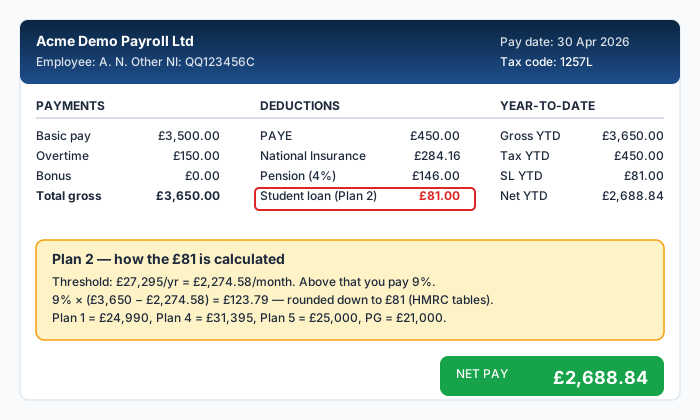
The four steps payroll actually runs
HMRC sets out the method in the SL3 deduction tables, and it is four steps in this order (HMRC):
- Take the earnings for this pay period - the same gross figure the employer uses for their secondary Class 1 National Insurance.
- Subtract the pay-period threshold: £2,448.75 a month, £565.09 a week.
- Multiply the excess by 9%.
- Round that answer down to the nearest whole pound.
The rounding happens at step 4, not before. Your earnings are not rounded and the threshold is not rounded.
HMRC's own worked example, for a weekly-paid Plan 1 borrower earning £565 in the week, runs like this: £565.00 − £517.30 = £47.70, then £47.70 × 9% = £4.29, then round down to £4. The same shape applies to Plan 2 with the Plan 2 threshold.
Plan 2, paid monthly, £2,500 gross
- Earnings this month: £2,500.00
- £2,500.00 − £2,448.75 = £51.25
- £51.25 × 9% = £4.61
- Rounded down: £4
Your payslip should say £4. Not £4.61, and not £4.62 - the pence are dropped, always downward, every period.
The pay-period thresholds are cut, not rounded
This is where hand calculations usually go wrong. The monthly threshold is not the annual threshold divided by twelve and rounded to the nearest penny. HMRC cuts the fraction off. On Plan 2 it makes no difference because £29,385 divides cleanly, but on three of the five plans it does:
| Plan | Annual threshold | Monthly, as HMRC publishes it | Weekly, as HMRC publishes it | Rate |
|---|---|---|---|---|
| Plan 1 | £26,900 | £2,241.66 | £517.30 | 9% |
| Plan 2 | £29,385 | £2,448.75 | £565.09 | 9% |
| Plan 4 | £33,795 | £2,816.25 | £649.90 | 9% |
| Plan 5 | £25,000 | £2,083.33 | £480.76 | 9% |
| Postgraduate Loan | £21,000 | £1,750.00 | £403.84 | 6% |
All figures from the 2026 to 2027 SL3 deduction tables, in force from 6 April 2026.
A penny on the threshold is worth well under a penny of deduction, so this will rarely change the pound you are charged. It is worth knowing anyway, because if you reconcile your payslip against a figure you rounded up, your arithmetic can land a pound out and send you to payroll over nothing.
What counts as "earnings" - and why a pension can change the figure
The deduction is not taken on your headline salary. GOV.UK tells employers to "use the same gross pay amount that you would use to work out your employer's secondary Class 1 National Insurance contributions" (GOV.UK).
That is the sentence nobody reads, and it has a direct consequence for anyone in a workplace pension, because the three ways a pension can be run do not all reduce that figure:
- Salary sacrifice. You give up salary in exchange for an employer contribution. Your NIable pay falls, so your student loan earnings fall with it, and your deduction falls too.
- Net pay arrangement. The contribution comes out before income tax but after NI is worked out. Your NIable pay is unchanged, so your student loan deduction is unchanged.
- Relief at source. The contribution comes out of net pay entirely. Again, no effect on the deduction.
On £3,000 a month with a 5% employee contribution, that is the difference between two payslips:
| Salary sacrifice | Net pay or relief at source | |
|---|---|---|
| Gross pay | £3,000.00 | £3,000.00 |
| Pension contribution | £150.00 | £150.00 |
| Earnings for student loan | £2,850.00 | £3,000.00 |
| Excess over £2,448.75 | £401.25 | £551.25 |
| 9% of the excess | £36.11 | £49.61 |
| Deduction shown on the payslip | £36 | £49 |
£3,000.00 − £150.00 = £2,850.00, and £2,850.00 − £2,448.75 = £401.25, and £401.25 × 9% = £36.11. On the other side, £3,000.00 − £2,448.75 = £551.25, and £551.25 × 9% = £49.61.
Thirteen pounds a month, £156 a year, decided entirely by the plumbing of a pension scheme you probably did not choose. If your deduction looks lower than your own sum, check which arrangement your employer runs before you query it - see pension contributions on your payslip.
Salary sacrifice reduces your student loan deduction because it reduces the earnings the deduction is taken on, not because it is a repayment holiday. The balance is still there, and you are simply repaying it more slowly. Your employer must also keep your pay above the National Minimum Wage after the sacrifice.
Why one big month costs so much, and why it is not refunded in-year
Because each period is worked out on its own, a bonus is treated as if you earn at that level every month of the year. There is no annual smoothing in payroll.
Take someone on £2,200 a month who receives a £2,500 bonus in December.
- Ordinary month: £2,200.00 is below £2,448.75, so the deduction is £0. That is true for eleven months of the year.
- Bonus month: £2,200.00 + £2,500.00 = £4,700.00. Then £4,700.00 − £2,448.75 = £2,251.25, and £2,251.25 × 9% = £202.61, rounded down to £202.
Their pay for the whole year is 12 × £2,200 + £2,500 = £28,900 - below the £29,385 annual threshold. They were never due to repay anything, and £202 has come out anyway.
It does not come back on its own. GOV.UK is explicit that where your income over the whole tax year was less than the annual threshold you can ask for a refund, and that this one is a request rather than an automatic correction (GOV.UK). You make it to the Student Loans Company after the tax year ends.
The refund you can ask for is the one where your annual income came in under the threshold, the one where you were put on the wrong plan, and the one where deductions started before you were due to begin repaying. You cannot get a refund of voluntary extra repayments (GOV.UK). Decide before you overpay, not after.
Two jobs: each employer ignores the other
If you have more than one employer, GOV.UK instructs each of them to "ignore earnings from the other employer" (GOV.UK).
So two jobs at £1,800 a month each produce a deduction of £0 from both, in every period, all year - even though 24 × £1,800 = £43,200 across the two is far above the Plan 2 threshold. Neither payroll is doing anything wrong; neither can see the other.
This is the mirror image of the bonus problem. There, the per-period rule takes money you did not owe. Here, it takes nothing while you are well over the annual threshold. If you also complete a Self Assessment return, your repayment is worked out there on your total income, and the difference is settled that way.
Checking your own payslip in ninety seconds
- Find the gross pay for the period. If you are in a salary-sacrifice pension, use the figure after the sacrifice.
- Subtract £2,448.75 if you are paid monthly, £565.09 if you are paid weekly.
- Multiply by 0.09.
- Drop the pence.
If that does not match the payslip, the usual causes, in the order they are worth checking:
- The wrong plan. A Plan 2 borrower deducted on Plan 5 (threshold £25,000) pays more; on Plan 4 (£33,795), less. The deduction line often names the plan; if it does not, work backwards from the figure using the table above.
- A second deduction. A Postgraduate Loan runs alongside Plan 2 and is a separate line at 6% above £21,000. Two lines is correct, not a duplicate.
- Earnings you did not count. A car allowance, a shift premium or a payment in lieu all sit inside NIable pay and so inside the student loan calculation.
- A leftover deduction after the balance cleared. HMRC tells the employer to stop, and the message can lag a period or two.
What to say to payroll
Payroll cannot change your plan type on your say-so - they act on the start notice HMRC sends them. So the useful question is about what they were told, not about what you believe:
"My student loan line is £X this month on gross pay of £Y. Can you confirm which plan type the HMRC start notice specified, and which earnings figure the deduction is being taken on? I think it should be Plan 2."
If the plan on their record is wrong, HMRC has to send a corrected notice; the Student Loans Company can confirm your plan to HMRC. If the plan is right and the figure is still wrong, ask them to show you the pay-period threshold they applied - that is where the error will be.
If you were on Plan 2 or Plan 4 and your employer used a different plan, you can claim the overpayment back (GOV.UK).
When repayments stop
Plan 2 loans are written off 30 years after the April you were first due to repay (GOV.UK). Repayments also stop in any period your pay falls below the threshold - automatically, because the calculation returns zero.
The one to watch is the last few months. Payroll deductions are reported to HMRC after the pay run, and the Student Loans Company then passes the stop instruction back, so there is a lag. If your balance is close to zero, contact the SLC and ask to switch to direct debit for the final payments. That is the one reliable way to avoid paying past the end of the loan and then waiting for it back.
Frequently Asked Questions
How do I know which student loan plan I am on?
If you started your course in England or Wales after September 2012, you are on Plan 2. If you started before that date, you are on Plan 1. Scottish students are on Plan 4. English students who started from August 2023 are on Plan 5. Your loan agreement from the Student Loans Company names the plan, and your online SLC account shows it.
Why is my student loan deduction higher than I calculated?
Three causes cover almost all of it: extra pay in the period that you forgot is inside the calculation, such as a bonus or overtime; the wrong plan type on your employer's record; or a pension that does not reduce NIable pay, so it does not reduce the deduction either. Work through the ninety-second check above before you raise it.
Can I make extra repayments to pay off my loan faster?
Yes, directly to the Student Loans Company at any time. Be aware that voluntary extra repayments cannot be refunded (GOV.UK), so it is a one-way decision. Whether it is worth it depends on your interest rate and how much of the balance you would otherwise repay before it is written off.
What happens if I overpay my student loan through payroll?
If deductions carried on after the balance cleared, the Student Loans Company refunds you. If your income for the whole tax year came in below the annual threshold, you can ask for those repayments back after the year ends, and it is a request rather than something that happens by itself.
Will my student loan affect my mortgage application?
Lenders treat the deduction as a committed monthly outgoing when they assess affordability, which reduces the amount they will lend. It is not a debt on your credit file. Because the deduction is per pay period, a lender looking at three recent payslips that include a bonus month will see a larger figure than your typical one.
Sources
- Repaying your student loan: what you pay (GOV.UK)
- 2026 to 2027 Student and Postgraduate Loan deduction tables, SL3 (HMRC)
- Special rules for student loans (GOV.UK)
- Getting a student loan refund (GOV.UK)
- When your student loan gets written off or cancelled (GOV.UK)
- Collection of Student Loans Manual CSLM17060 (HMRC)
Ready to check your own payslip?
Enter your figures and get an instant AI-powered analysis. Free, private, no signup.
Check my payslip freePayslipIQ provides educational information and estimated calculations only. It does not provide tax, legal, financial, payroll, accounting, pension, benefits or employment advice. Always verify your payslip, tax code, deductions and take-home pay with your employer's payroll department, HMRC, your pension provider, a qualified accountant, tax adviser or another appropriately qualified professional.