YTD stands for year to date. On a UK payslip, it shows the running total of your earnings and deductions from 6 April (the start of the tax year) up to the current pay period. These figures help you track whether your tax and National Insurance are on course for the year.
To check whether the tax, NI and PAYE lines look right on your own slip, see How do I check my payslip is correct?.
The figures behind a YTD column, 2026/27
| Figure | 2026/27 value | In force from | Source |
|---|---|---|---|
| Date every YTD total resets to zero | 6 April | statutory start of the tax year | GOV.UK |
| Tax-free pay built up on code 1257L | £1,047.50 a month, so £6,285.00 by month 6 and £12,570 by month 12 | published Personal Allowance for 2026/27 | HMRC |
| Basis income tax is worked out on | Cumulative: every payday recalculates the whole year to date | long-standing PAYE rule, not reset annually | GOV.UK |
| Basis National Insurance is worked out on | Each pay period on its own, against the published monthly or weekly thresholds | long-standing NI rule, not reset annually | HMRC |
| Monthly NI thresholds a monthly payslip actually uses | £1,048 and £4,189 - not one twelfth of £12,570 and £50,270 | published thresholds for 2026/27 | HMRC |
| Employee NI rates | 8% between the two monthly thresholds, 2% above the upper one | 6 April 2024, unchanged since | HMRC |
The two deduction lines on your payslip are worked out on different bases, and that is the single thing that makes a YTD column hard to check. Income tax is cumulative, so the tax YTD is recalculated from scratch every payday. National Insurance is not, so the NI YTD is only the sum of separate monthly sums. Every figure re-read at HMRC on 27 September 2026.
Want to check if your own payslip adds up?
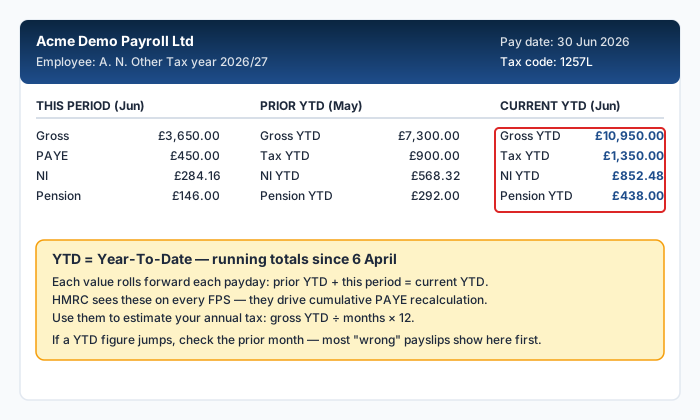
What YTD figures appear on your payslip
Most payslips show year-to-date totals for at least four items:
- Gross pay YTD: your total earnings before deductions since 6 April
- Tax paid YTD: the total income tax deducted so far this tax year
- NI paid YTD: the total National Insurance contributions deducted
- Pension YTD: your total pension contributions (not always shown)
Some payslips also show taxable pay YTD, which is your gross pay minus any pre-tax deductions such as salary sacrifice pension contributions.
Why YTD figures matter
YTD totals serve as a cumulative check on your deductions. Because UK income tax is calculated cumulatively, your employer uses the YTD figures to ensure you are paying the right amount of tax across the year, not just in any single month.
If you received a bonus in one month, your tax for that month will be higher. But the YTD figures show whether, across all months so far, your total tax is correct relative to your total earnings. This is the mechanism that prevents you from permanently overpaying after a one-off high-earning month.
Worked example
You earn £2,500 gross per month on tax code 1257L. By the end of month 6 (September):
- Gross pay YTD: 6 × £2,500 = £15,000.00
- Personal Allowance used YTD: 6 × £1,047.50 = £6,285.00
- Taxable pay YTD: £15,000 - £6,285 = £8,715.00
- Tax paid YTD: £8,715 × 0.20 = £1,743.00
If your payslip shows a tax YTD figure close to £1,743, your deductions are on track. A significant discrepancy may indicate a tax code issue.
YTD figures reset to zero on 6 April each year. If your April payslip shows a large YTD figure, check whether your employer's tax year start date aligns with the standard UK tax year.
How to use YTD to spot errors
You can use YTD figures to cross-check your payslip in several ways:
- Multiply your monthly gross pay by the number of months elapsed. The result should be close to your gross pay YTD.
- Calculate your expected cumulative tax using the method above. Compare it to the tax paid YTD on your payslip.
- Check the NI YTD month by month, not against a cumulative total. Add up 8% of the part of each month's pay between £1,048 and £4,189, plus 2% of anything above £4,189. On a flat £2,500 a month that is (£2,500 − £1,048) × 8% = £116.16 a month, so £696.96 by month 6.
If the tax check reveals a gap of more than a few pounds, it can be worth investigating. Common causes include a mid-year tax code change, an emergency tax code in earlier months, or a payroll error. The NI check is different: see the next section before you assume a gap there is an error.
Why your NI YTD will not match 8% of your pay
Income tax is cumulative. National Insurance is not. Your employer works your NI out on each pay period in isolation, against HMRC's published monthly thresholds of £1,048 and £4,189 (HMRC), and never goes back and recalculates earlier months. The NI YTD figure is a running total of twelve separate sums, not a year-to-date calculation.
Two consequences follow, and both surprise people.
The monthly thresholds are not the annual ones divided by twelve. HMRC publishes £1,048 a month; £12,570 ÷ 12 is £1,047.50. Over six months at £2,500 that is £696.96 of NI against the £697.20 an annual-basis sum would predict. The gap is pennies, but it is why a hand-check never lands exactly.
A bonus in one month costs less NI than the same money spread over the year. Take £2,500 a month for eleven months and a twelfth month of £2,500 plus a £10,000 bonus, so £40,000 for the year:
| Month | Pay | NI charged |
|---|---|---|
| Months 1 to 11 | £2,500 each | £116.16 each, £1,277.76 in total |
| Month 12 (with the bonus) | £12,500 | £251.28 at 8% up to £4,189, plus £166.22 at 2% above it - £417.50 |
| Year total on the period basis | £40,000 | £1,695.26 |
Someone earning the same £40,000 in even instalments pays £2,194.40. The bonus month is £499.14 cheaper in National Insurance, because the pay above £4,189 in that single period is charged at 2% instead of 8%, and nothing reconciles it afterwards. Income tax does reconcile - that is what the cumulative basis is for - so the same bonus leaves the tax YTD looking right and the NI YTD looking wrong. It is not wrong.
YTD and your P60
At the end of the tax year, your employer issues a P60 that summarises your total earnings and deductions for the year. The figures on your P60 should match the YTD totals on your final payslip of the tax year (the one covering the period ending on or just before 5 April).
If they do not match, raise it with your payroll department. Incorrect P60 figures can cause problems with HMRC's end-of-year reconciliation and may result in an unexpected tax bill or delayed refund. For more on how these documents relate, see our guide on payslip vs P60 vs P45.
If you changed jobs during the tax year, your current employer's YTD figures only cover the period since you started with them. Your P45 from your previous employer should have been used to carry forward the earlier YTD totals. If it was not, your cumulative tax calculation may be wrong.
YTD when you have multiple jobs
If you have more than one job, each employer tracks YTD figures independently. There is no automatic mechanism for combining them. This means the YTD totals on one payslip do not reflect earnings from the other job.
HMRC manages the overall picture by allocating your Personal Allowance to one job (usually the higher-paying one) and giving the other a BR or D0 tax code. At the end of the year, HMRC reconciles the totals from all employments to check you have paid the correct amount overall.
You can run your figures through our payslip checker to see whether the deductions on any single payslip look correct for that employment.
Frequently Asked Questions
What does YTD stand for?
YTD stands for year to date. In the context of a UK payslip, it means the cumulative total from 6 April (the start of the tax year) to the date of the current payslip.
Why is my tax YTD higher than I expected?
Common reasons include a tax code change during the year, an emergency tax code applied in earlier months, or a bonus that temporarily pushed your earnings into a higher tax band. Check your tax code history and compare your YTD figures against a manual calculation.
Do YTD figures include my previous employer?
Only if your current employer received your P45 and carried forward the YTD totals. If you started a new job without providing a P45, your current employer's YTD figures start from zero at the date you joined.
Should my P60 match my final payslip YTD?
Yes. The gross pay, tax, and NI figures on your P60 should match the YTD totals on your last payslip of the tax year. If they differ, ask your payroll department to investigate.
Can I use YTD figures to estimate my annual tax?
Yes. If your pay is consistent each month, you can divide your tax YTD by the number of months elapsed and multiply by 12 to estimate your annual tax. This is a rough guide and may not account for bonuses or tax code changes later in the year.
Why does my NI YTD not equal 8% of my pay above the threshold?
Because National Insurance is not cumulative. Your employer charges it on each pay period on its own, against HMRC's published monthly thresholds of £1,048 and £4,189, and never recalculates earlier months. A month with a bonus is charged 2% on everything above £4,189 in that period, and nothing reconciles it later, so the NI YTD is genuinely lower than an annual sum would suggest. Income tax behaves the opposite way.
Sources
All sources were opened and checked by PayslipIQ on 27 September 2026.
- GOV.UK: Understanding your payslip. What a payslip must show. Verified 27 Sep 2026.
- HMRC (GOV.UK): Income Tax rates and Personal Allowances. The £12,570 Personal Allowance behind the £1,047.50 a month of tax-free pay on code 1257L. Verified 27 Sep 2026.
- HMRC (GOV.UK): Rates and thresholds for employers 2026 to 2027. The monthly National Insurance thresholds of £1,048 and £4,189 and the 8% and 2% employee rates. HMRC publishes the monthly figures directly; they are not the annual figures divided by twelve. Verified 27 Sep 2026.
- HMRC (GOV.UK): P45, P60 and P11D forms. What the P60 must agree with. Verified 27 Sep 2026.
Ready to check your own payslip?
Enter your figures and get an instant AI-powered analysis. Free, private, no signup.
Check my payslip freePayslipIQ provides educational information and estimated calculations only. It does not provide tax, legal, financial, payroll, accounting, pension, benefits or employment advice. Always verify your payslip, tax code, deductions and take-home pay with your employer's payroll department, HMRC, your pension provider, a qualified accountant, tax adviser or another appropriately qualified professional.