If you have overpaid income tax, the refund often appears directly on your payslip rather than as a separate payment from HMRC. This guide explains how payslip tax refunds work, when you might be owed one, and what to do if you think you have overpaid.
To check whether the tax, NI and PAYE lines look right on your own slip, see How do I check my payslip is correct?.
Want to check if your own payslip adds up?
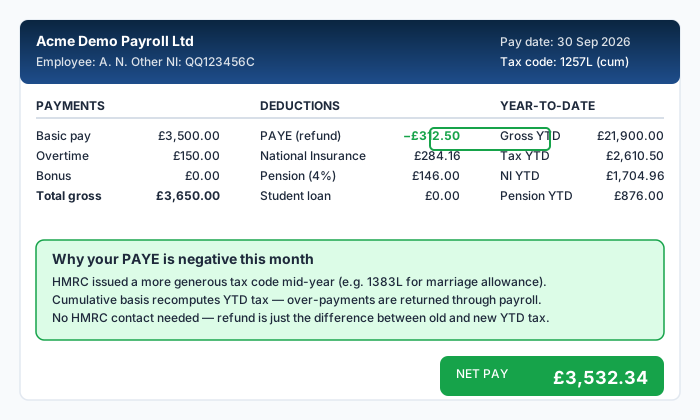
How a tax refund appears on your payslip
When your employer's payroll system calculates that you have overpaid tax so far this tax year, it reduces the tax deduction on your next payslip to compensate. In some cases, the adjustment is large enough that the tax figure for the period is negative, meaning tax is being returned to you rather than deducted.
On your payslip, this typically appears as:
- A negative number in the "Tax this period" column
- A label such as "Tax refund" or "PAYE adjustment"
- A net pay figure that is higher than your usual take-home pay
The year-to-date tax figure will also decrease, reflecting the fact that your cumulative tax paid has been reduced.
Common reasons for a payslip tax refund
- Your tax code was corrected: if you were on an emergency code or an incorrect code, the switch to the right code triggers a cumulative recalculation, and any overpaid tax is refunded
- You started a new job mid-year: the cumulative system accounts for months when you were not earning, applying the unused Personal Allowance to reduce your tax
- Your earnings dropped: if you moved from full-time to part-time, or had unpaid leave, your cumulative tax may exceed what is due on your lower cumulative earnings
- A benefit in kind was removed: if a taxable benefit (such as a company car) was removed and your tax code was updated, the recalculation may produce a refund
- An overpayment from a previous period: payroll corrections or backdated adjustments can result in a refund in the current period
Worked example
You started a new job in month 4 (July) on an emergency tax code 1257L M1. For months 4 to 6, you paid £390.50 per month in tax on £3,000 gross. In month 7, HMRC issues your correct cumulative 1257L code.
- Cumulative gross pay (months 4-7): 4 × £3,000 = £12,000
- Cumulative Personal Allowance (months 1-7): 7 × £1,047.50 = £7,332.50
- Cumulative taxable pay: £12,000 - £7,332.50 = £4,667.50
- Cumulative tax due: £4,667.50 × 0.20 = £933.50
- Tax already paid (months 4-6): 3 × £390.50 = £1,171.50
- Tax for month 7: £933.50 - £1,171.50 = -£238.00
The negative figure means £238.00 is refunded through your October payslip.
A payslip tax refund does not require you to fill in any forms. It happens automatically when your employer's payroll system recalculates your cumulative tax position. You do not need to contact HMRC for in-year refunds processed through payroll.
Refunds after the tax year ends
If the tax year ends (5 April) before the overpayment is corrected through your payslip, HMRC will review your records and may issue a P800 tax calculation. This letter tells you whether you have overpaid or underpaid tax for the year.
If you are owed a refund, you can claim it online through your Personal Tax Account or wait for HMRC to send a cheque. The P800 process typically runs between June and November after the end of the tax year.
If you stopped working during the tax year and are not expecting further employment before 5 April, you can claim an in-year refund using form P50, available on GOV.UK.
How to check if you are owed a refund
You can estimate whether you have overpaid tax by comparing your actual deductions with the expected amount:
- Calculate your expected annual tax using your tax code and gross salary
- Divide by the number of months elapsed to get the expected cumulative tax
- Compare with the tax paid YTD figure on your payslip
If your tax paid YTD is significantly higher than the expected figure, you may be due a refund. Our payslip checker can help you run this comparison quickly.
Be cautious of unsolicited emails or texts claiming you are owed a tax refund. HMRC does not send refund notifications by email or text. Genuine refunds come through your payslip or via a P800 letter. If in doubt, log in to your Personal Tax Account on GOV.UK to check.
Refunds for previous tax years
If you believe you overpaid tax in a previous tax year (up to four years ago), you can write to HMRC or use the online form to request a review. You will need your P60 for the relevant year and details of why you think you overpaid. HMRC will check your records and issue a refund if one is due.
For more on how emergency tax codes can lead to overpayment, or what to do if you suspect your tax code is wrong, see our related guides.
Frequently Asked Questions
How long does a payslip tax refund take?
If the refund is triggered by a tax code correction within the current tax year, it usually appears on your next payslip. For end-of-year refunds via P800, HMRC typically processes these between June and November.
Will I receive the refund as a separate payment?
No. In-year refunds are processed through your payroll and appear as a reduced tax deduction (or a negative tax figure) on your payslip. Your net pay for that period will be higher than usual.
Can I get a refund if I left my job?
Yes. If you left your job and did not start a new one before the end of the tax year, you can claim a refund using form P50. If you started a new job, the cumulative system at your new employer should correct any overpayment automatically.
Is a tax refund taxable?
No. A tax refund is a return of money you have already overpaid. It is not treated as income and is not subject to further tax.
How do I avoid overpaying tax in the first place?
The most effective step is to ensure your employer has your correct tax code. Provide your P45 when starting a new job, and check your Personal Tax Account on GOV.UK to confirm your code is right.
Sources
Ready to check your own payslip?
Enter your figures and get an instant AI-powered analysis. Free, private, no signup.
Check my payslip freePayslipIQ provides educational information and estimated calculations only. It does not provide tax, legal, financial, payroll, accounting, pension, benefits or employment advice. Always verify your payslip, tax code, deductions and take-home pay with your employer's payroll department, HMRC, your pension provider, a qualified accountant, tax adviser or another appropriately qualified professional.