If you are employed in the UK, aged between 22 and State Pension age, and earn above £10,000 per year, your employer is legally required to enrol you into a workplace pension scheme. This is called auto-enrolment. The contributions appear as a deduction on your payslip, and understanding how they work is important for both your current take-home pay and your future retirement income.
To check whether the tax, NI and PAYE lines look right on your own slip, see How do I check my payslip is correct?.
Want to check if your own payslip adds up?
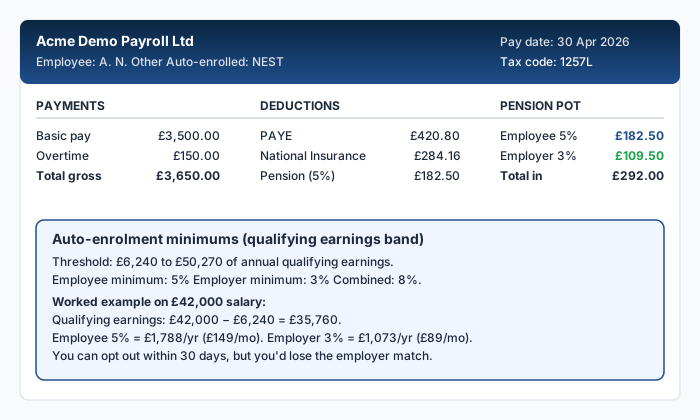
How auto-enrolment works
Under auto-enrolment, both you and your employer contribute to your pension. The minimum total contribution is 8% of your qualifying earnings, split as follows:
| Contributor | Minimum rate |
|---|---|
| Employee | 5% |
| Employer | 3% |
| Total | 8% |
Your employer's contribution is paid on top of your salary and does not appear as a deduction on your payslip. Your 5% contribution is deducted from your pay and will appear as a separate line.
What are qualifying earnings?
Qualifying earnings are the portion of your pay between the lower and upper thresholds set by the government. For 2026/27 these are unchanged from the previous year:
- Lower threshold: £6,240 a year (£520 a month, £120 a week)
- Upper threshold: £50,270 a year (£4,189 a month, £967 a week)
- Earnings trigger for automatic enrolment: £10,000 a year
Source: DWP, review of the automatic enrolment earnings trigger and qualifying earnings band for 2026/27.
Your pension contribution is calculated on earnings between these two figures, not on your total gross pay. This means the first £520 per month is excluded from the calculation.
Worked example
You earn £2,800 gross per month. Your pension contribution under auto-enrolment:
- Monthly qualifying earnings: £2,800 - £520 = £2,280
- Employee contribution (5%): £2,280 × 0.05 = £114.00
- Employer contribution (3%): £2,280 × 0.03 = £68.40
Your payslip should show approximately £114 deducted for your pension. The employer's £68.40 is paid separately and does not reduce your pay.
Some employers calculate pension contributions on total gross pay rather than qualifying earnings. This is more generous, as it includes earnings below the lower threshold. Check your pension scheme documentation or ask your HR department which method your employer uses.
Tax relief on your pension contributions
One of the main advantages of a workplace pension is tax relief. There are two methods:
Relief at source: your employer deducts the contribution after tax. The pension provider then claims basic-rate tax relief (20%) from HMRC and adds it to your pension pot. If you are a higher-rate taxpayer, you can claim the additional relief through Self Assessment.
Net pay arrangement: your employer deducts the contribution before tax is calculated. This means you automatically receive full tax relief at your marginal rate, because the contribution reduces your taxable pay. No further claim is needed.
Your payslip will show which method is used. Under net pay, the pension deduction appears before the tax calculation. Under relief at source, it appears after.
How pension contributions affect your take-home pay
Pension contributions reduce your take-home pay, but the reduction is smaller than the headline percentage suggests because of tax relief. Under a net pay arrangement:
| Gross pay | Pension (5%) | Tax saving (20%) | Net cost to you |
|---|---|---|---|
| £2,800 | £114.00 | £22.80 | £91.20 |
The £114 going into your pension only costs you £91.20 in reduced take-home pay, because £22.80 less tax is deducted. If you are a higher-rate taxpayer, the saving is even greater.
If you opt out of auto-enrolment, you lose both the tax relief and your employer's contribution. For most people, this means giving up free money. Your employer is required to re-enrol you every three years, but you can opt out again each time.
Salary sacrifice pensions
Some employers offer pension contributions through salary sacrifice. Under this arrangement, you agree to reduce your contractual salary by the amount of your pension contribution. Your employer then pays the full amount (your share plus theirs) into your pension.
The advantage is that salary sacrifice reduces your gross pay for NI purposes as well as tax, saving you an additional 8% (or 2% above the Upper Earnings Limit) in NI. Your employer also saves on employer NI, and some pass part of this saving into your pension.
For more on how salary sacrifice works, see our guide on salary sacrifice explained.
Checking your pension deduction
To verify the pension figure on your payslip:
- Identify whether your scheme uses qualifying earnings or total gross pay
- Apply the correct percentage (5% minimum, or whatever your scheme specifies)
- Compare the result with the deduction shown
If the figures do not match, check whether your employer has applied a different contribution rate (some schemes require higher contributions) or whether a salary sacrifice arrangement is in place.
Frequently Asked Questions
Can I opt out of auto-enrolment?
Yes. You can opt out within one month of being enrolled and receive a full refund of any contributions already deducted. After that, you can stop contributing at any time, but you will not receive a refund of contributions already paid into the scheme.
What happens to my pension if I change jobs?
Your pension pot stays with the scheme provider. You can leave it there, transfer it to your new employer's scheme, or consolidate it with other pensions. Your new employer will auto-enrol you into their own scheme.
Is the 5% employee contribution the maximum?
No, it is the minimum. You can contribute more if you wish, and you will receive tax relief on contributions up to your annual allowance, which is £60,000 for 2026/27, or 100% of your earnings if that is lower.
Does my pension contribution reduce my student loan repayment?
Only if contributions are made through salary sacrifice, which reduces your gross pay. Under relief at source, your gross pay is unchanged, so student loan repayments are not affected.
How do I find out how much is in my pension pot?
Your pension provider should send you an annual statement. You can also log in to their online portal to check your current balance, contributions, and investment performance.
Sources
Ready to check your own payslip?
Enter your figures and get an instant AI-powered analysis. Free, private, no signup.
Check my payslip freePayslipIQ provides educational information and estimated calculations only. It does not provide tax, legal, financial, payroll, accounting, pension, benefits or employment advice. Always verify your payslip, tax code, deductions and take-home pay with your employer's payroll department, HMRC, your pension provider, a qualified accountant, tax adviser or another appropriately qualified professional.